App Orchestrator
This page allows you to select the orchestrator pattern for the app and make the required configurations for the same.
An orchestration pattern refers to the architectural pattern or structured approach in which multiple agents coordinate, communicate, and execute tasks to accomplish a goal. It defines how agents work together, take control of the execution flow, delegate tasks, and make decisions or resolve conflicts.
The Platform supports the following types of orchestration patterns:
- Single Agent - The application can use this pattern of orchestration when it consists of a single agent that independently handles the requests and generates responses. This is ideal for apps with one primary capability. Learn More
- Supervisor - This pattern introduces a central controller that analyzes requests, delegates tasks to specialized agents, and synthesizes the response based on the agent responses. Learn More.
- Adaptive Network - In this pattern, the agents collaborate in a distributed manner, intelligently routing tasks based on their capabilities and context. Learn More.
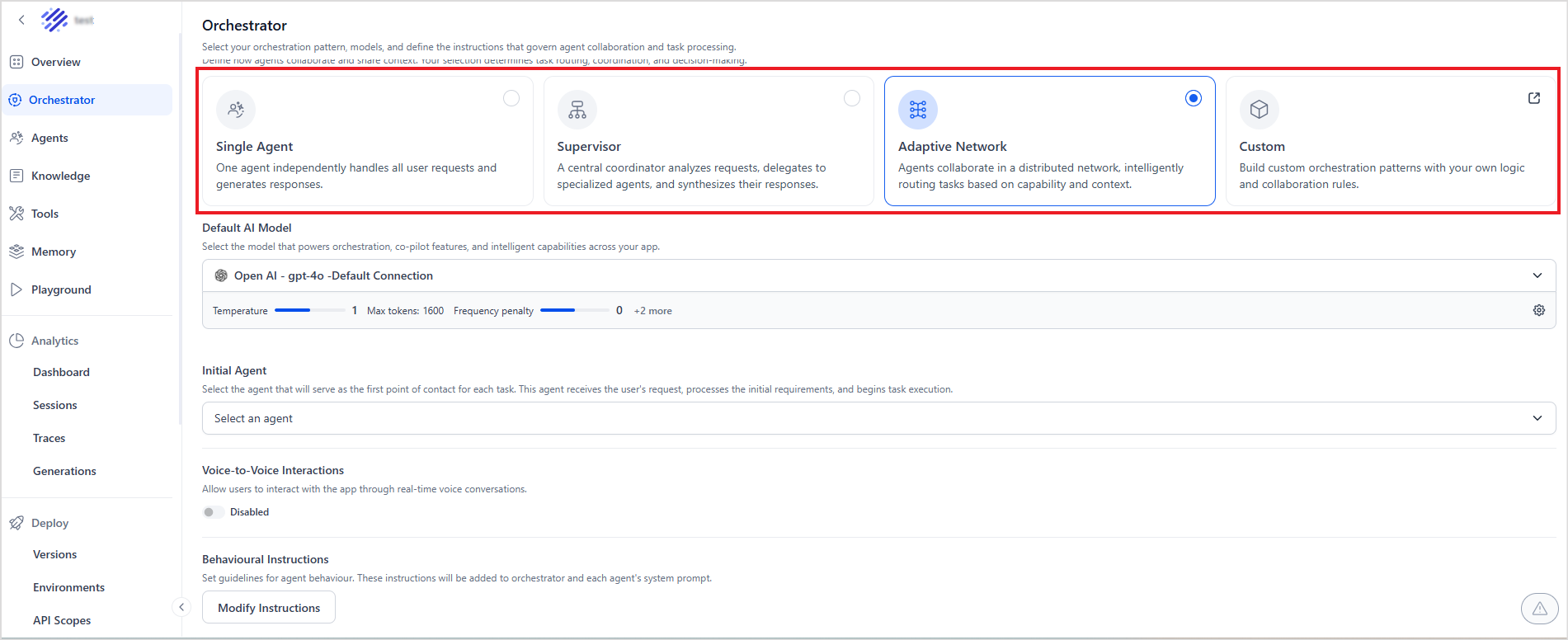
Orchestrator Configuration
For each orchestration pattern, configure the following.
Default AI Model
AI model to be used for operations across the app. Select any of the configured models. The default settings of the model are shown. Click the Settings icon to update the default settings.
Voice-to-Voice Interactions
Enable this field to allow users to interact with the app via real-time voice conversations. Once enabled, also provide the AI model that processes speech and generates voice responses. The Platform supports various models. See how to add an external model to the Platform.
Behavioral Instructions
Use this section to set the guidelines for the agent's behaviour. These instructions will be added to the orchestrator and the system prompt of each agent. Click Modify Instructions, then enter the prompt.
Response Processor
The Response Processor is an application-level feature that lets you run a custom script on every agent response before it is delivered to the end user. It executes as the final stage in response generation, after the agent generates its output and before the output leaves the platform. Because it's configured at the app level on the Orchestrator page, the script applies consistently across all agents in the app, regardless of which agent handled the request.
Using the Response Processor to Generate Artifacts Developers can write artifact payloads directly inside the Response Processor code. When the processor runs, it constructs the desired payload, writes it into the artifacts key, and the platform appends it for delivery. This is particularly useful when:
- The artifact needs to be assembled from multiple tool outputs or session variables rather than a single tool response.
- The payload structure depends on business logic better handled centrally at the application level.
- No tool is needed, the processor can produce artifacts independently based on input context alone.
Using the Response Processor to Transform Existing Artifacts When tools have already populated the artifacts array, the Response Processor can be used to enrich or transform it before delivery: Reorder elements to control which artifact renders first.
- Filter artifacts based on channel, user segment, or business logic.
- Transform or enrich payload data before delivery to the client.
- Merge multiple tool outputs into a single consolidated artifact.
- Add metadata, wrapper keys, or channel-specific formatting.
Note
When a Response Processor is active, streaming is not supported. Artifacts and the text response are delivered as a complete payload after the processor finishes. If the processor fails, the original untransformed response is returned, and the error is logged.
Adding Response Processor
Click the Add Script to open the script editor. The following are available as input to the script.
- Input: The original user input that triggered this agent run
- Output: The agent’s response that's generated by the agent.
- Artifacts: Array of tool outputs and structured data returned during the run by different tools.
Response Processing Script: Provide the script that updates the output before delivering to the end user. You can use JavaScript or Python for this scripting.
Namespace: Select the namespaces to be provided to the script. All the variables within the namespace are available to the script for processing.
Use the Test Response Processor to validate the script's behavior.
Single Agent Configuration
In a Single Agent setup, all user requests are routed directly to the agent. Since no supervisor agent is involved, the agent’s prompt serves as the primary instruction set for the underlying model.
When processing a request, the platform constructs a single consolidated prompt by combining the following components in order, and sends it to the model:
- Agent Prompt - The core instructions that define the agent’s role and behavior.
- Behavioral Instructions - Guidelines that control tone, constraints, and response style.
- Tools Assigned to the Agent -Tool definitions available for the agent to invoke.
- Events Enabled in the Application - Event-related context.
Supervisor Configuration
In addition to the configurations discussed above, configure the following for the Supervisor pattern.
- Orchestrator Prompt - A set of instructions for the supervisor of the app. This includes instructions and requirements that guide the orchestrator's decision-making process.
- Orchestration Prompt for Voice-to-Voice Interactions: This prompt serves as instructions for the supervisor in case of voice interactions.
Adaptive Network Configuration
In addition to the configurations discussed above, configure the following for the Adaptive Network pattern.
- Initial Agent: Select the agent that serves as the first point of contact for each task. This agent receives the user's request, processes the initial requirements, and begins task execution.
For this pattern, configure the agents with the delegation rules. Refer to this to learn more.